

Cold email deliverability depends on five things at once: authentication, sender reputation, list hygiene, sending rhythm, and message content. If any one of those breaks, Gmail or Outlook can filter the message before a buyer ever sees it. Use the checklist below in order: authentication first, then reputation, then list quality, then content.
Why deliverability fails before the first reply
When a cold email campaign underperforms, the copy is the easy thing to blame. The failure usually starts earlier. Mailbox providers judge the sender before they judge the offer. They look at whether the domain is authenticated, whether the sending IP and domain have a stable reputation, whether recipients engage, and whether the message looks like bulk mail.
A weak email infrastructure shows up in small ways first. Replies fall, bounce rate rises, and more messages land outside the inbox. If the same mailbox also sends invoices, support replies, and cold outreach, a complaint on one campaign can damage the reputation of every message from that domain. Separate your cold email sending domain from the domain you use for day to day business, so a campaign problem stays contained.
Inbox placement is also a list problem. A purchased list can look clean in a spreadsheet and still contain spam traps, role addresses, and people who never opted in. No subject line can repair that. If you are evaluating an agency, use this cold email agency checklist to see whether they audit infrastructure and list source before they promise reply rates.
The 7-point diagnostic table
Start with the checks that can block delivery outright. Each row tells you what good looks like and where to verify it.
| Check | What good looks like | Where to verify |
|---|---|---|
| SPF | A DNS TXT record lists the sending IPs and services you authorize | DNS and Google Admin Toolbox |
| DKIM | A valid cryptographic signature with a 1024-bit or longer key, 2048 recommended | DNS and sending platform |
| DMARC | A policy record that aligns From with SPF or DKIM; p=none can meet the baseline but does not enforce | DNS |
| Sender reputation | Stable volume, low spam complaints, consistent domain use | Google Postmaster Tools |
| List hygiene | No purchased lists, hard bounces removed, role addresses checked | CRM and verification tool |
| Warm-up | Volume rises in phases and pauses when bounce or complaint signals spike | Sending platform |
| Content triggers | No deceptive subjects, no attachment-only messages, clear unsubscribe | Content QA |
Google’s bulk sender threshold applies to senders pushing more than 5,000 messages per day to Gmail accounts. Smaller senders still need authentication. The requirements become stricter as volume grows, and the reputation signals are watched either way.
Spam to inbox: what the published data shows
We found no independent before-and-after dataset for cold email placement. The figures below are the best public evidence, with the source and its limits stated.
| What was measured | Result | Source and caveat |
|---|---|---|
| Global inbox placement, 2025 | 87.2%, with a 12.4-point spread across major mailbox providers | Validity 2026 Email Deliverability Benchmark Report, via Dreamlit. The full report is form-gated; provider figures are as reported in secondary coverage. Includes opted-in marketing mail, not cold email only. |
| Provider range, 2025 | Gmail 89.8%; Microsoft 77.4% | Same Validity report, via Dreamlit. Shows the spread behind the 12.4-point gap. |
| Cold emails that never reach the inbox | About 17% | SmartReach, State of Cold Email 2026 (vendor-reported) |
| Effect of SPF, DKIM, and DMARC on replies | 108 contacts per reply when authenticated vs 120 when not, about 11% more work | Smartlead, 850M+ emails, senders with at least 500 emails. Lower is better. Platform data, not a controlled test. |
| Mailbox provider, contacts needed per reply | Gmail 90, Outlook 120, custom servers 179 | Same Smartlead report. Platform data, not a controlled test. |
| Warm-up traffic inbox placement | About 99% | Same Smartlead report, which calls this a health check rather than a target. Warm-up mail is exchanged between cooperating mailboxes, so real cold mail will place lower. |
One vendor study of 833K+ managed inboxes reports 91.3% inbox placement for warmed inboxes vs 68.4% for unwarmed inboxes in the first week, a 22.9-point gap (MailDeck via Mailtester, 2026; vendor-reported, not independently audited).
Field example (vendor-reported)
Thomas Tzouridis, who runs the cold email agency ActiScale, told Warmy that around October 2025 results fell across all of his clients and out-of-office replies fell at the same time. An out-of-office reply is only triggered when a message reaches the inbox, so he read the drop as a deliverability problem rather than a copy or targeting problem. After switching warm-up providers he reported far fewer burned mailboxes and about 40% lower mailbox spend (Warmy). This is a vendor’s own customer story, not independent data.
A quick diagnostic you can reuse: if reply volume and out-of-office replies fall together, check inbox placement and authentication before rewriting your copy.
What we found in 75 industrial domains
We also ran a DNS-only scan of 75 industrial and B2B domains, drawn from 16 industrial search queries on 2026-10-24. This is configuration data, not inbox placement.
| Signal | Result |
|---|---|
| SPF record present | 67 of 75 (89.3%) |
| DMARC record present | 55 of 75 (73.3%) |
| DMARC at quarantine or reject | 31 of 75 (41.3%) |
| DMARC rua reporting address | 35 of 75 (46.7%) |
| DKIM detected at common selectors | 37 of 75 (49.3%) |
| BIMI record present | 0 of 75 (0.0%) |
| Microsoft MX | 31 of 75 (41.3%) |
Most domains publish SPF, but only 31 of 75 (41.3%) have DMARC at enforcement, and fewer than half publish a reporting address. DKIM detection at common selectors does not prove a domain has no DKIM, but it does mean a sender cannot assume a third party will find the key. No domain in this industrial sample published BIMI, which fits the provider-support and certificate friction described in our BIMI guide.
Method and limits: 75 domains from Tavily Google top results for 16 industrial queries, DNS-over-HTTPS, 2026-10-24. Convenience sample, not representative; DKIM selectors tested were default, google, selector1, selector2, s1, k1, mail, dkim; DNS configuration does not prove inbox placement.
Authentication: SPF, DKIM, and DMARC
SPF (RFC 7208) authorizes sending IPs through a DNS TXT record. It tells the receiving server which servers are allowed to send mail for the domain. DKIM (RFC 6376) adds a cryptographic signature to outbound mail, so the receiver can check that the message was authorized by the domain and was not altered in transit. DMARC (RFC 7489) aligns the From domain with SPF or DKIM and sets a policy for what the receiver should do when alignment fails.

Under Google’s current sender rules, all senders need SPF or DKIM, while bulk senders need SPF, DKIM, and DMARC. The DMARC enforcement policy can be set to none and still meet the baseline, but p=none only monitors. It does not tell the receiver to quarantine or reject failing mail. Moving to quarantine or reject is a reputation decision, and it should follow a period of clean reporting.
Use a DKIM key of 1024 bits or longer. Google recommends 2048 bits when the domain provider supports it. A short key is easier to break and can weaken the value of the signature you are publishing.
Check alignment as well as record existence. The domain in the From header must match either the SPF domain or the DKIM domain. If the From domain is your brand but the DKIM signature belongs to a third party sending platform, check the alignment before you scale. A record can exist and still fail alignment.
Once authentication is stable, BIMI is a separate brand-display layer. If you are evaluating it, use our BIMI record requirements guide.
Warm-up and sending rhythm
Warm-up is a behavior pattern, not a fixed day count. Start with a small batch of contacts who are likely to engage, then increase volume only when bounce and complaint signals are stable. If complaints or hard bounces rise, pause and fix the list or the message instead of pushing more volume through the same mailbox.
Warm-up ramp: what published guidance recommends
Google and Microsoft do not publish a warm-up schedule. The ranges below come from deliverability vendors and platform data, so treat them as guidance, not rules.
| Source | Starting volume | Ramp length | Per-mailbox guidance |
|---|---|---|---|
| Warmy, new domain | 20 to 40 emails/day | 3 to 4 weeks | Not specified |
| Warmy, high-volume outbound teams | 20 to 30 emails/day per mailbox | 4 to 6 weeks | Not specified |
| Warmy 45-day manual schedule | Up to 5/day to the most engaged contacts, then 10 to 15/day until about 100 unique contacts | 45 days | 50+/day by days 15 to 25 |
| Hunter | A few per day on a new account | 2 to 4 weeks | About 50/day per warmed inbox; split volume across inboxes beyond that |
| Mailivery, Google Workspace | 20 to 30 warm-up emails/day | At least 14 days | 30 to 50 cold emails/day early on |
| Smartlead platform data (850M+ emails) | Typical mailbox sends 13.9/day; heaviest 10% send 42/day | Typical wait before first campaign: 8.0 days | Stated safe limit: 50/day |
Hard sending caps, not warm-up advice: Google Workspace paid accounts allow 2,000 messages per day per user, with 500 on trial accounts. Microsoft 365 allows 10,000 recipients per day per mailbox and 30 messages per minute. These are platform limits, not deliverability targets.
Our reading across the sources: start between 5 and 40 emails a day, ramp over roughly 2 to 6 weeks, keep any single mailbox at or below about 50 cold emails a day, and add mailboxes rather than volume when you need to scale. If bounces, deferrals, or blacklist listings climb, drop back before pushing further.
For a step-by-step domain warm-up protocol, use this email domain warm-up playbook.
Give each SDR a sending identity that matches the domain strategy. Do not mix a high-volume cold email campaign with transactional mail from the same mailbox. A separate sending domain and a separate mailbox make it easier to isolate a problem when one campaign goes wrong.

List hygiene and bounce control
Remove hard-bounced addresses after the first failure. A hard bounce is a permanent delivery failure, and repeated sends to the same address waste volume and damage sender reputation. Suppress unsubscribes immediately, check role addresses such as sales@ or info@ before you add them, and keep a record of where each list came from.
Do not buy a list and assume a verification tool will fix it. Verification reduces risk, but it cannot create consent. A purchased list can contain spam traps that never appear in a normal bounce report. If the source is a scraped directory or a data vendor with no opt in history, the safest move is to leave it out.
Monitor bounce rate by campaign and by domain. A sudden change usually points to a bad segment, a typo in a source file, or a new sending configuration. Fix the source, not the subject line.
Content triggers and monitoring
Content can still push an authenticated message out of the inbox. Avoid deceptive subject lines, attachment-only messages, image-heavy emails with little text, and shortened links that hide the destination. Include a clear unsubscribe path in marketing and subscribed messages. If you are implementing one-click unsubscribe, use our List-Unsubscribe header guide.
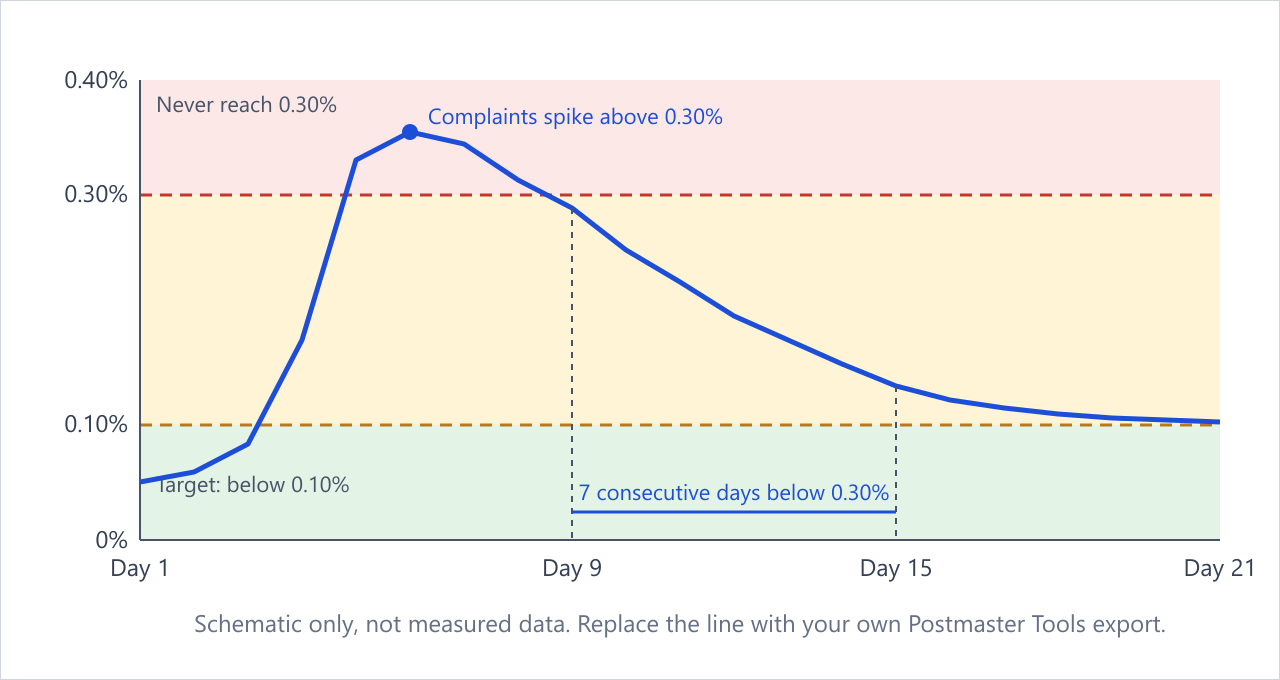
Monitor spam complaints, spam score, and reply rate by campaign. Google’s sender guidelines say to keep the spam rate reported in Postmaster Tools below 0.10% and to avoid ever reaching 0.30%. A rising spam score or complaint rate is a signal to pause the campaign and audit the list and the offer. Reply rate is a useful secondary signal, but a low reply rate does not always mean a deliverability problem. Check inbox placement first.
Reading your Postmaster Tools spam rate
| Rule | What it means | Source |
|---|---|---|
| Below 0.10% | The level Google asks bulk senders to keep the reported spam rate under | Google email sender guidelines |
| Never reach 0.30% | Three complaints per thousand delivered messages is enough to cross the line | Google sender guidelines |
| Calculated daily | Postmaster Tools updates spam rates daily, not in real time | Google sender guidelines FAQ |
| 7 consecutive days | After a rate above 0.30%, bulk senders regain eligibility to request mitigation only after staying below 0.30% for 7 consecutive days | Google sender guidelines FAQ |
| Blind spot | If mail is already going to spam, fewer recipients see it and complain, so the visible rate can look calmer while placement is still poor. Check inbox placement, not just the spam rate. | Analysis, not a Google rule |
Use the same discipline for every segment. A manufacturing list and a SaaS list may need different email content, but the authentication and monitoring rules do not change. If you also run manufacturing lead generation, keep the sending domain and the mailbox rules consistent across campaigns.
What to fix first
Fix authentication first. Publish SPF, DKIM, and DMARC, confirm alignment, and move DMARC from monitoring to enforcement only when the reports are clean. Then remove hard-bounced and purchased addresses, then warm up the domain, then review content triggers. Monitoring comes after those basics are stable.
FAQ
What is cold email deliverability?
Cold email deliverability is the share of cold outreach messages that reach the recipient’s inbox instead of the spam folder or a blocked queue. It depends on authentication, sender reputation, list quality, sending rhythm, and message content.
Do I need SPF, DKIM, and DMARC for cold email?
Google requires SPF or DKIM for all senders and SPF, DKIM, and DMARC for bulk senders that push more than 5,000 messages per day to Gmail accounts. Even below that threshold, all three records reduce filtering risk.
How do I warm up a cold email domain?
Use a phased warm-up: start with engaged contacts, increase volume in stages, and pause when bounce or complaint signals rise. Warm-up is a behavior pattern, not a fixed day count.
What spam rate is too high?
Google says keep the spam rate reported in Postmaster Tools below 0.10% and avoid ever reaching 0.30%. A rising spam score or complaint rate is a signal to pause and fix the list or content.
What should I fix first?
Fix authentication first with SPF, DKIM, and DMARC, then remove hard-bounced and purchased addresses, then warm up the domain, then review content triggers. Monitoring comes after those basics are stable.
When to get help
If you want a second pair of eyes, our team can review your records, sending setup, and list source in one pass. Book a free deliverability audit and we will tell you what to fix before you send another campaign. If you need the full outbound service, start with our cold email outreach service page.